Creating and Changing Visual Log Unit Conversions
Create a new linear conversion or edit an existing one. These are simple mathematical equations consisting of a From and To units label and a numeric multiplier.
In order to be available to a particular curve, the From unit label you define for the new or modified conversion factor must match the label for the units in which a curve is currently in.
The Unit Conversions table contains the conversion factors that convert the curve data from one unit to another. For example, inches to milimeters. Visual Log uses this function to adjust the curve display when the actual units of a curve differ from the requested display units. Using the Curve Alias table, set the default units in which curves in a track are displayed.
To create and change unit conversion factors
- Using the Visual Log tab, click System Settings (
 ) and from the drop-down list, select Unit Conversions.

The System Settings dialog box appears.
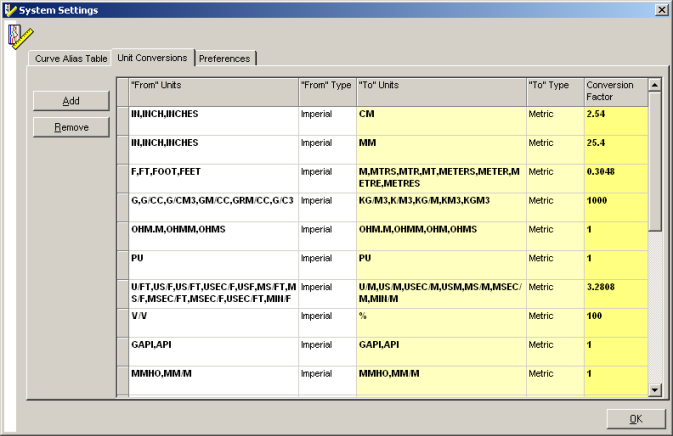
- Using the Unit Conversions tab, click Add.
A row labeled NEW appears at the bottom of the grid.
- Type from and to units along with a conversion factor, and then click OK.
 Related Topics

IHS Markit™